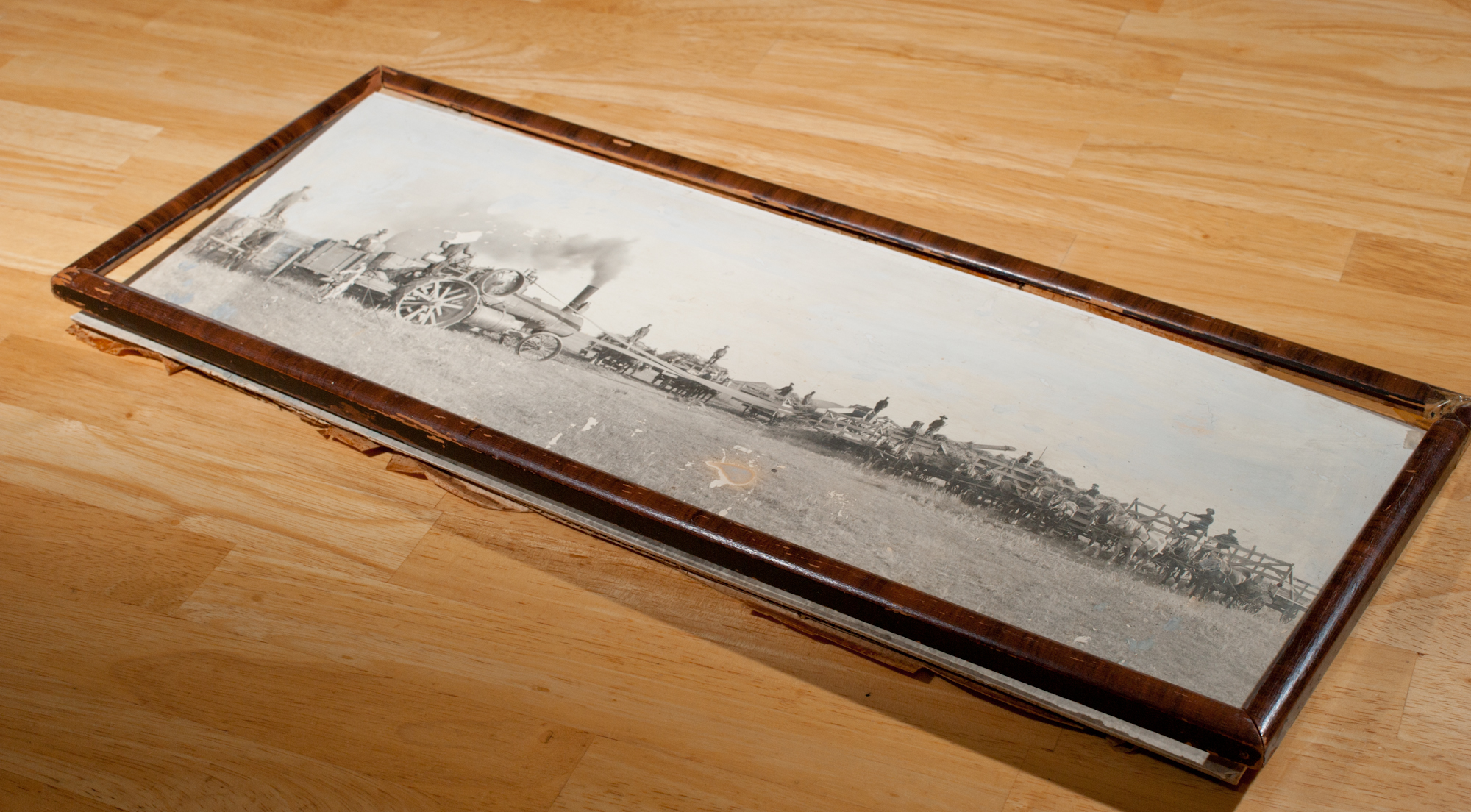
This 84 year old print had seen much better days. Note the missing glass, broken frame, water stains, fading, paint...
A friend asked me the other day if I knew anyone who could retouch/repair a vintage photograph. It’s not something I readily do, and indeed I was quite hesitant. At first I told him there might be someone else in town, but he would have to chase them down. After thinking about it for a few minutes, I changed my mind and said I would take it on.
He actually had the picture in his truck. It was 8 inches tall, 20.25 inches long, a sepia tone black and white style print, glued onto a stiff cardboard and backed by everyday cardboard. It was in a thin, broken wooden frame with no glass. His kids had damaged it, and he would like to be able to hang this image on his wall again. I showed him a canvas wrap in my truck, and that appealed to him.
On the image in flowing handwriting is writen: H.J. Skoech – Threshing Outfit – Riverhurst., Sask. 1927 – Capitol Studio, Regina.
That makes this print 84 years old. Kid glove treatment here.
Looking really close at it, you can see this is going to be a challenge. There’s some water spots on the grass – no big deal. Numerous scratches throughout – again, something I can cope with. Some writing needs to be repaired. The sky appears to have been painted white at some point, perhaps a previous retouch? But the biggest problem is the missing head of one thresherman, the man standing on tractor. And he just happens to be the most prominent person in the picture? How on earth am I going to fix that? On other parts, previous owners had coloured in the missing horse’s ears with pencil.
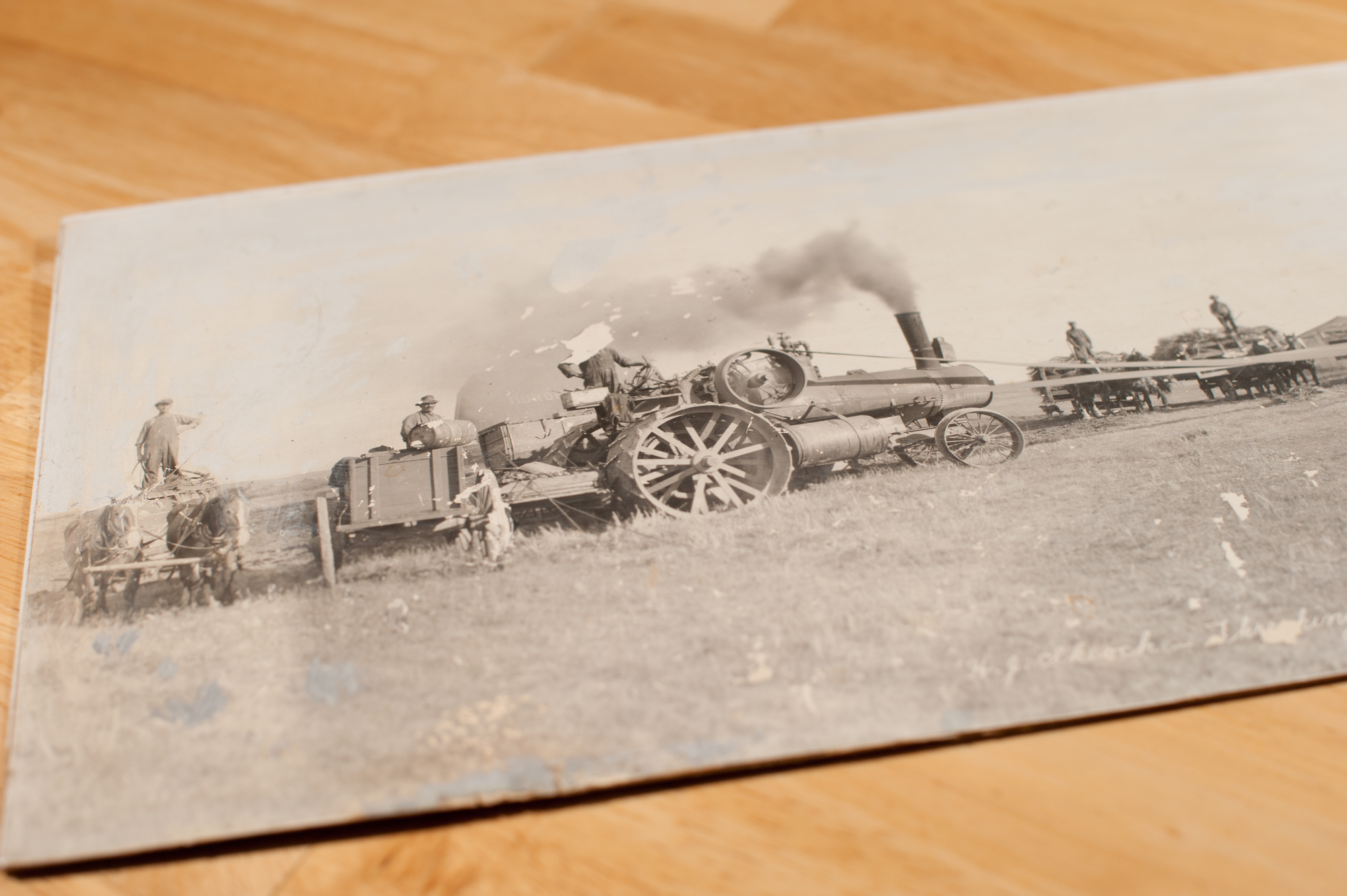
This is a closer view of the original photo.
A challenge, to be sure. (Note: clicking on any of these photos will show you a larger version.)
The first thing I did was run to Staples and buy a new high quality photo scanner, and Epson Perfection V500 Photo. My older Canon 4400F decided to die on my when I plugged it in last. It had hardly been used, and it appears the drive belt became misformed, and would jump.

Acquiring this Epson V500 scanner was the first step in restoring this photo.
The scanner can do negatives up to 9600 DPI, but there’s no way I would need that sort of resolution. I eventually chose 1200 DPI, which resulted in a file size of 612 megabytes before doing any editting or adding any layers. Comparing the photo under a lamp magnifying glass to the screen, and it looks like I got all the resolution available. It’s amazing to consider a 84 year old camera and film had resolution of 14,000 x 9,200 pixels That’s 128.8 megapixels, if you’re keeping track. I could have possibly scanned at 2400 DPI and got a file four times larger, but it would have crashed even my loaded to the nuts quad core processor.
The trick is to do all this editing non-destructively, so that I can go back if need be.
An adjustment curve layer found that the histogram is very low contrast. I cranked up the curve somewhat to bring out more contrast.
Zooming in to 50% revealed there are a lot more scratches than I thought. Hundreds. It really freaked me out when I saw a similar photo in my manual, and they said it took, oh, 24 hours. Oy.
So how do you eat an elephant? One bite at a time. I would start from the left, and work right.
Most of the small imperfections were easy enough to fix with the healing brush in Photoshop. The larger area with waterstains or big chunks missing required more cloning. The missing writing meant faking it as best as possible with a mouse.
I swept from the bottom left, across the grass to the middle right. That was the easy part. Grass by and large looks like grass, so it was relatively easy to clone and heal.
Panning left, there were little chunks missing here and there. But then coming across the detail portion of the picture I found my first missing head (well, part of a head, and a good chunk of a shoulder). It was a horse. A horse is a horse, of course, of course, unless it’s missing its head!
This was a dark horse, and thankfully, in a similar position to one about four horses over. So using a thinly feathered lasso tool, I copied the head of the other horse, and then pasted and manipulated it over the missing horse. Once it fit right, and I had erased the feathered edge as need be, I could flatten that horse head layer down into the lower layer of the image.
Next came a substantial chunk of missing wagon wheel. Much of this was essentially made up by sampling very small parts of the remainder of the wagon wheel.
If you look closely, on the left hand side behind the steam tractor, there is a barn that says “HURON” on it. I punched up the contrast on it, and brought it back to life.
The wagon on the left was missing almost an entire wheel, having been scratch. The extreme left horse was also missing the top of its head, requiring yet another head transplant.
Finally, the biggest challenge was replacing the head of the engineer, the man running the steam tractor, and the largest figure in the photo. He was missing his whole head, right shoulder and right lung.
Since he was much larger than the other figures, whoever I copied had to be small enough that you could not tell the source, and yet detailed enought to blow up. on the original photo, the heads of the potential candidates were about 3/16 of an inch tall, or smaller than the round oend of a clicker on your ballpoint pen. Actually, its about the length of the part of the refill that sticks out of a ballpoint pen.
Yet this photo, taken 84 years ago, had enough detail in a reproduction, never mind the original negative, to pull it off with a little help!
I again feather-lassoed the donor’s head, copied, and pasted. Oh boy, that’s not very big, I thought. It was expanded about 3x in each dimension, meaning that it was now 9x the original size. Thankfully, the shirt was a close match, and a little bit of the pencil tool drawn on the hat and face gave it some texture.
This was before:
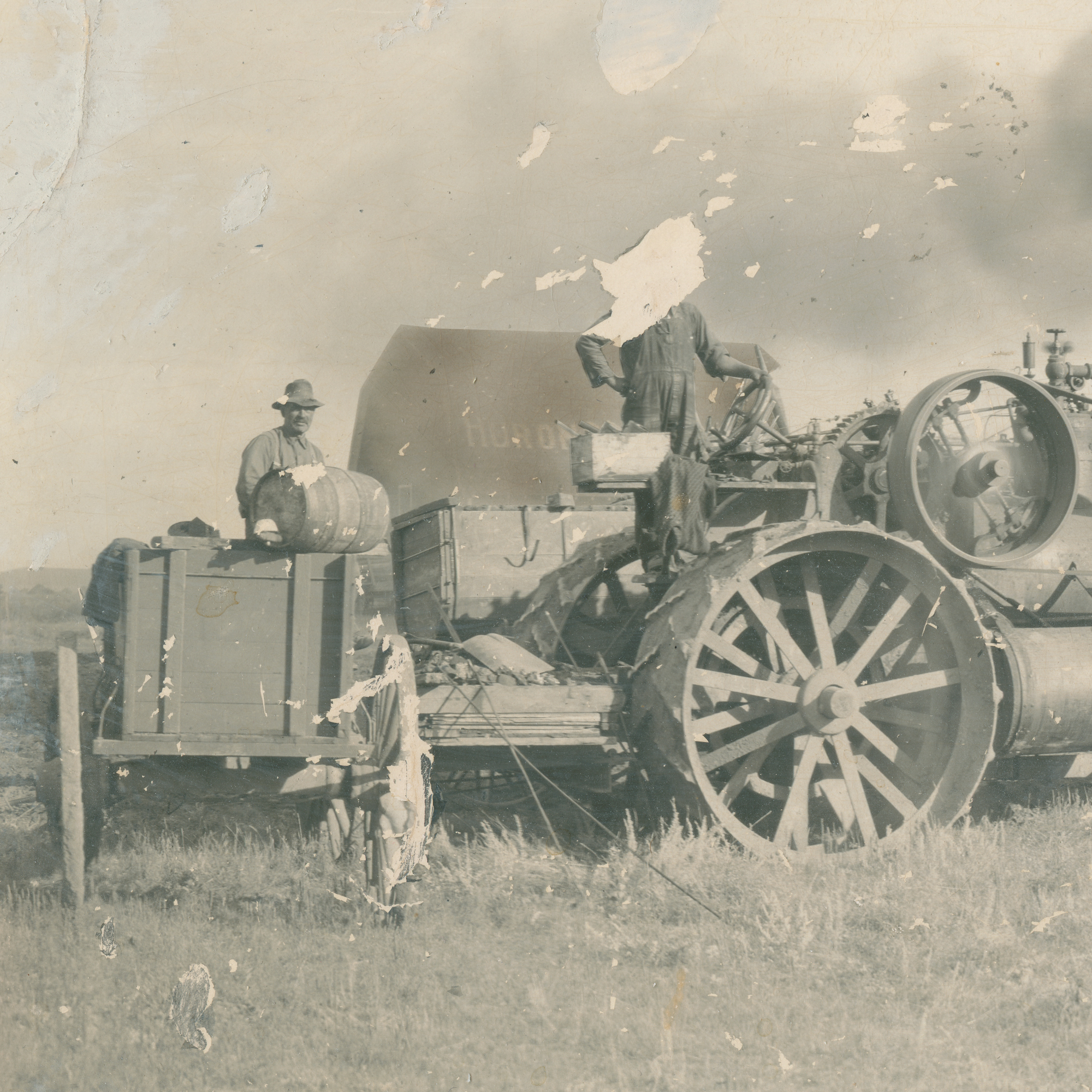
Notice the missing head? That was the biggest challenge.
And this was the after:
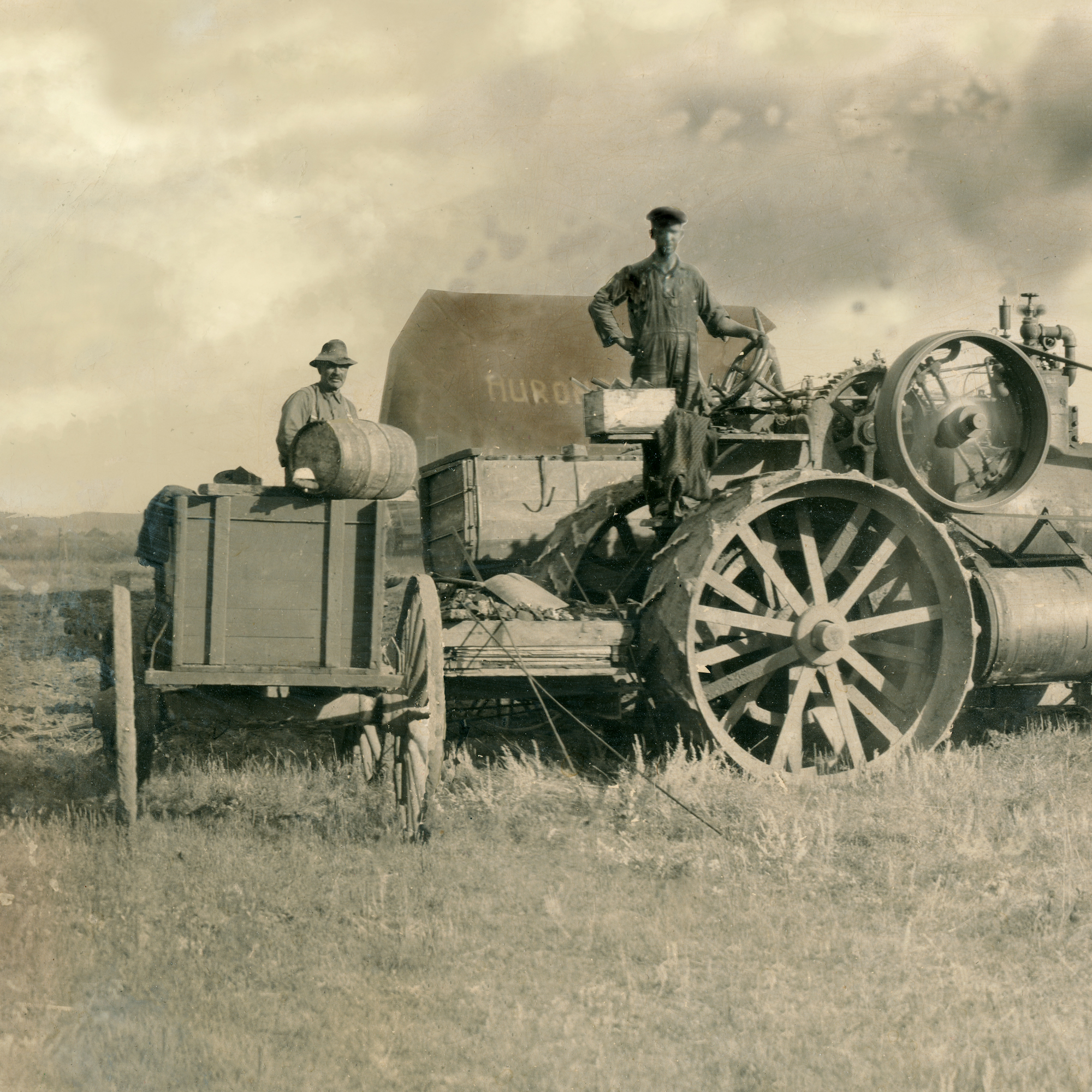
This is the rebuilt photo. Pay close attention to the head, wagon wheel, barn, and sky.
The final challenge was the sky. There was none. Someone had painted over it in a mismatched white paint. I had considered just filling it with a gradient, blank sky, similar to what the original seemed to have, but that would have looked even more phony than the paint.
Google and YouTube to the rescue. I found a tutorial on creating clouds out of nothing. The trick is, find a cloud from another picture, then create a cloud “brush” in Photoshop. In real world terms, this is like cutting a potato to make a stamp, like you did in summer camp. So I went to a family shoot I did in October, 2010, which had a very dynamic blue sky with pronounced white clouds. I copied two of these, and created two cloud stamps. Plucking the colour out of the original sky, I basically went hog-wild, stamping these clouds all over the sky, varying them so it looked like a texture, instead of a hog-wild stamping adventure. The key thing was to cover the numerous scratches and paint streaks that had shown up quite clearly from the high-resolution scan.
The final destination for this would be a canvas wrap. However, the client did not want any of the people to “wrap around” the edges of the frame. This left me in a bit of a pickle, because there was not enough space aroud the image to fill in the 1.5 inch wrap sides and bottom. As a result, I had to enlarge the whole photo by 4 inches, creating sky and grass on each side and below, where there was none. This was basically cloned out of thin air, or grass, from nearby.
This now much larger file created a conundrum, because by this point, the image exceeded the maximum 20,000 pixels in one dimension that Photoshop would save in a .jpg. The final file was also over 2 gigabytes in size, and it would not save even the Photoshop .psd file. So after going through all this effort to maintain every possible pixel of detail, I had to downsample the whole image slightly, reducing the resolution by about 20 %, just so the damned thing would save.
In the end, flattening layers and downsampling got it to a saveable size.
The final print would end up being a custom size, which required extra time for framing at my supplier, Bay Photo. The final print was 40 inches wide and 16 inches tall. That doubled the dimensions in each direction, which meant it was 4x the original size. It was shipped via UPS from Santa Cruz, California, and arrived on Dec. 19, in time for Christmas.
Here is the the whole picture before:
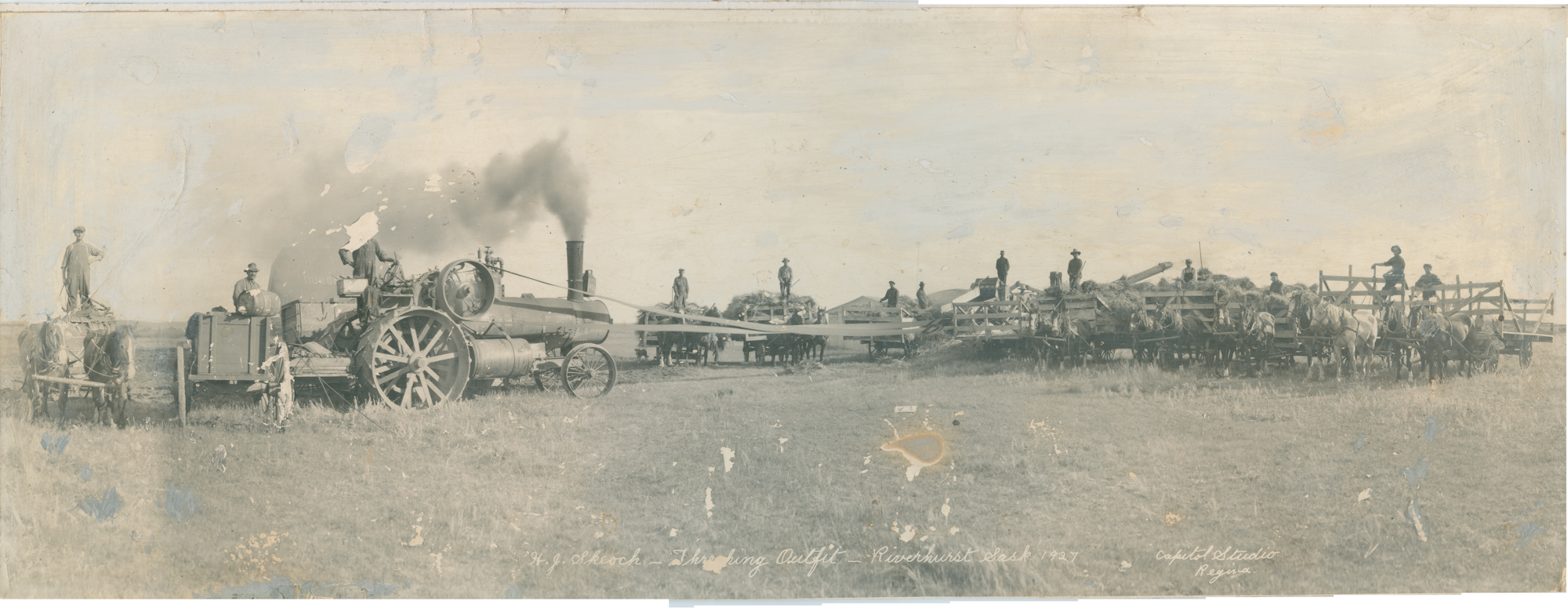
This is the orginal scan, merged, but with no other editting.
Here is the completed picture:

This is the final version, with the added space on the sides and bottom, allowing for the wraparound sides.
Click here to see the larger versions on my galleries page.
All told, the editting work probably totalled 15-18 hours, maybe a bit more, which was not far off from the time my book noted for a much simpler picture. It was a challenging project, and not a cheap one either, but the client seemed quite happy with the result.
It was a challenging project, but well worth it.





 Brian Zinchuk Publishing